
Перейти к содержанию
View in the app

A better way to browse. Learn more.

Arena V

A full-screen app on your home screen with push notifications, badges and more.

To install this app on iOS and iPadOS
  1. Tap the Share icon in Safari
  2. Scroll the menu and tap Add to Home Screen.
  3. Tap Add in the top-right corner.
To install this app on Android
  1. Tap the 3-dot menu (⋮) in the top-right corner of the browser.
  2. Tap Add to Home screen or Install app.
  3. Confirm by tapping Install.
Galaxy

Black-Drako

Пользователь
  • Зарегистрирован

  • Посещение

About Me

Оборотень Дракон/Леопард, с возможностью перемешивать эти формы в любом сочетании.
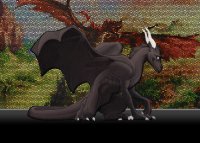
В драконьей ипостаси: в холке 190см, в длинну где-то 7,5м, цвет обычно черный (по желанию может быть леопардовой расцветки)
Леопардовой ипостаси: примерно 70 см в холке, в длинну примерно 1,7м , цвет обычно пятнистый (по желанию может быть и черным)
Добрый, отзывчивый, злюка, со своим хомяком в голове (выжил всех тараканов из черепушки), жутко ленивое создание

Аккаунт

Навигация

Поиск

Поиск

Configure browser push notifications

Chrome (Android)
  1. Tap the lock icon next to the address bar.
  2. Tap Permissions → Notifications.
  3. Adjust your preference.
Chrome (Desktop)
  1. Click the padlock icon in the address bar.
  2. Select Site settings.
  3. Find Notifications and adjust your preference.